
How to Use ChatGPT for Beginners
Artificial Intelligence (AI) has become an important part of our daily lives, and one of the most famous ,well known AI tools today is ChatGPT. Whether you’re a worker, student, freelancer, content creator, business owner, or someone who wants to save time, ChatGPT can make your work more easier increase your productivity and assist you to in best and possible ways.
If you’ve never used ChatGPT before then , don’t worry. This beginner-friendly guide will teach you everything you you need to know—from creating an account to writing better prompts and getting more accurate possible responses.
By the end of this article, you’ll know how to confidently use chatGPT for studying, reading,writing, coding, brainstorming, and you ‘ill understand , whats the purpose of chatgpt is ,After reading this blog everything will be easy to understand.
What Is ChatGPT?
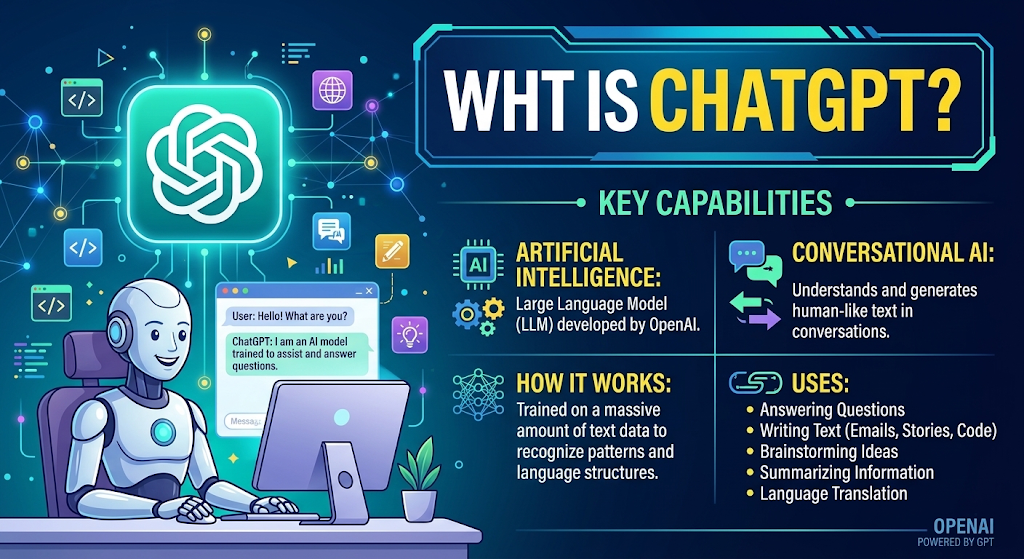
ChatGPT is an AI-based chatbot developed by OpenAI. It can understands natural ( all type of languages for example urdu, english , hindi japanese french etc ) and can respond to quires, explain concepts, generate content, solve problems,and provide solution Give solution write code, translate languages, summarize text, and assist with many daily tasks.
imagine of ChatGPT as a smart digital personnel assistant that is available whenever you need help.
Why Should Beginners Use ChatGPT?
ChatGPT is designed to be simple ,easy to use and user friendly. Instead of learning complwx software, you just type your question in plain English (or many other languages for example you type prompt in urdu , french hindi as well as roman urdu ), and ChatGPT will responds within seconds.
Some common uses include:
- Writing emails. articles and letters
- Solving student homework questions
- Learning new skills
- Brainstorming ideas
- Creating blog posts
- Writing social media captions
- Summarizing/Finalizing articles
- Improving grammar
- Translating text
- Generate any type of image
- Writing proporsals
- Getting coding help
How to Get Started with ChatGPT
Step 1: Create an Account
Visit the official ChatGPT website and sign up using your email address, and Google account, or Apple account.
After signing in, you’ll be direct to the ChatGPT dashboard where you can start chatting at the same time .
Step 2: Start a New Chat
Click the New Chat button and type your question in the message box.
For example:
- Explain prompt.
- Write a professional email.
- Suggest business ideas.
- Help me learn Python.
Press Enter, and ChatGPT will generate a response. with in a few second
Step 3: Ask Clear Questions
The quality of the answer depends on prompt
Instead of writing:
Tell me about laptops.
Try:
Recommend the best laptops for students under one lac with at least 8GB RAM and SSD storage.
The more details you provide, the better the response. if the prompt is more clear and you will get more and precise response
Understanding Prompts
A prompt is just the instruction or question you give ChatGPT.
Weak Prompt
Write an article.
Better Prompt
Write a 1,500-word SEO-friendly blog post about the best budget laptops for students. Include headings, FAQs, and a conclusion.
Clear prompts produce better results.
With the help of chatgpt you can also create projects
What Can ChatGPT Help You With?
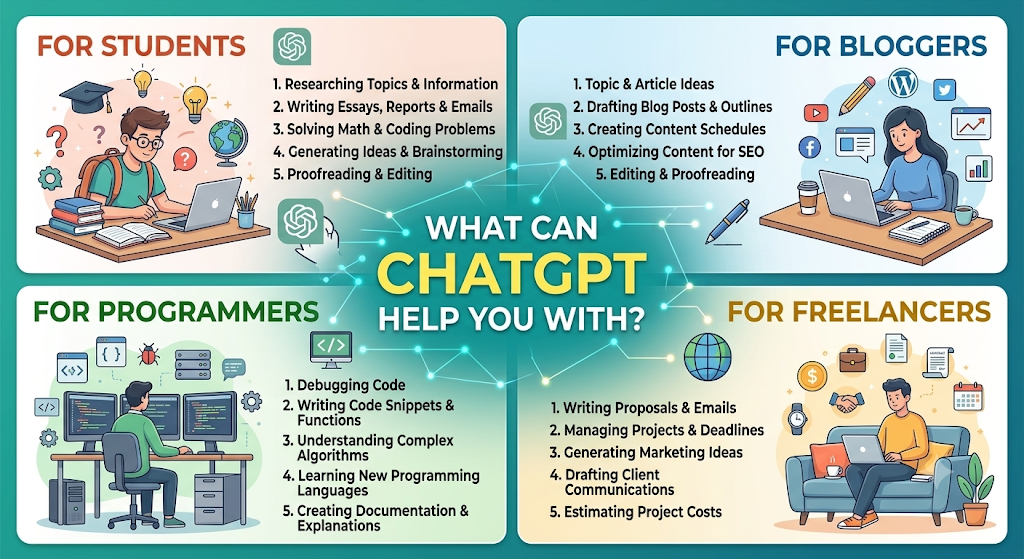
For Students
- Homework assistance
- Research summaries
- Assignment ideas
- Exam preparation
- Grammar improvement
- Presentation outlines
For Bloggers
- Keyword research ideas
- SEO blog outlines
- Meta descriptions
- Article writing
- Content editing
- Title suggestions
For Freelancers
- Proposal writing
- Client emails
- Resume improvements
- Cover letters
- Business ideas
- Time-saving automation ideas
For Programmers
- Debugging code
- Learning programming languages
- Explaining code
- Writing scripts
- SQL queries
- HTML and CSS help
Tips for Getting Better Answers
To make the most of ChatGPT:
- Be specific about your request.
- Mention the desired word count.
- Specify the writing tone (formal, friendly, professional, etc.).
- Ask for step-by-step explanations when learning.
- Provide context whenever possible.
- Request revisions if the first answer isn’t exactly what you need.
Remember, ChatGPT improves its responses based on the information you provide.
Related Articles
Blog-latest articles
Common Mistakes Beginners Should Avoid
Many new users don’t receive the best quality results because they:
- Ask very vague questions.
- Expect perfect answers without giving context.
- Don’t review AI-generated content before publishing.
- Ignore fact-checking for important topics.
- Forget to ask follow-up questions.
Think of ChatGPT as an assistant, not a replacement for your voice.
Is ChatGPT Free?

Yes, ChatGPT offers a free version that is suitable for everyday routine tasks.
There are also paid plans that offer additional features, faster response times, and access to more advanced AI models.
The best option will depend on your personal or professional needs.
Best Practices for Using ChatGPT
- Double-check the main facts.
- Use it to learn the things instead than simply copy answers.
- Protect your personal information.
- Try with different prompts.
- Combine ChatGPT with your own creativity.
Real-Life Examples
Here are a few ways people use ChatGPT every day:
Student
“Summarize this chapter in simple words.”
Blogger
“Write an SEO-friendly introduction for my article.”
Office Worker
“Draft a professional meeting invitation email.”
Programmer
“Explain this Python error and suggest a fix.”
Small Business Owner
“Create a one-week social media content calendar.”
Frequently Asked Questions (FAQs)
Is ChatGPT easy for beginners?
Yes. ChatGPT is designed with a simple chat interface, making it easy for beginners to ask questions and receive helpful answers.
Can I use ChatGPT for studying?
Absolutely. It can explain concepts, summarize notes, create quizzes, and help you prepare for exams.
Is ChatGPT always correct?
No. While ChatGPT is highly capable, it can occasionally make mistakes. Always verify important information using trusted sources.
Can ChatGPT write blog posts?
Yes. It can generate blog outlines, introductions, full articles, SEO titles, and meta descriptions. However, it’s a good idea to review and personalize the content before publishing.
Do I need technical knowledge to use ChatGPT?
Not at all. If you can type a question, you can use ChatGPT. No coding or technical expertise is required.
Conclussion
Learning how to use ChatGPT for beginners is one of the easiest and best ways to increase your productivity in today’s digital world.
Whether you study, write, read, program, run a business, or just want answers right away, ChatGPT will be your valuable daily assistant.
The key to getting good answers is asking clear questions, providing enough context, and using AI responsibly. As you practice writing more effective prompts, you’ll discover just how powerful and versatile ChatGPT is. Start with simple tasks, explore its features, and gradually use it for more complex projects. With a little practice, ChatGPT can help you save time, improve your workflow, and learn new skills more efficiently.
If you want to explore chatgpt




Pingback: How to Earn Money from Blogging (Beginner's Complete Guide 2026)
Pingback: Latest Android Features in 2026: Everything You Need to Know